Where Your Agent Lives
I moved the whole dev environment onto a server so any device could reach it. That bought reach, and cost something quieter.
TL;DR
- One always-on VPS is now the only place my code and my agent live. Every other device is a client.
- The stack: a small Contabo VPS on Ubuntu, OpenCode as an always-on service under systemd, Tailscale as the private network, Caddy in front for HTTPS, Cloudflare for DNS, Let’s Encrypt for the certificate, and a GitHub repo for the config.
- Clients: the OpenCode TUI over SSH on the laptop, the OpenCode mobile app on the phone (paired by QR), and VS Code Remote-SSH when I want an editor. They all point at the same server, so they share the same sessions.
- Gains: one session on every screen, a machine that never closes, no laptop dependency, and reach in the gaps.
- Costs: a box you have to secure, your keys on someone else’s disk, an agent that acts while you are not watching, one blast radius, and a monthly bill.
I was standing in a queue, the kind where nobody moves for twenty minutes, and I pulled out my phone. The session I had started that morning on my laptop was there. Not a summary. Not a notification. The same conversation, mid-thought, exactly where I had left it. I asked for a change, watched the diff come back, and put the phone away before the line moved.
When I got home, the laptop showed the same session. Already further along.
That was the moment the setup stopped being an experiment.
What actually changed
For years my development environment was my laptop. The code, the agent, the credentials, the half-finished branches. Everything lived on one machine, and that machine was the single point of everything.
Now the code lives on a VPS, a small Contabo box running Ubuntu. OpenCode runs there as an always-on service under systemd, which means it survives a closed laptop, a dropped SSH session, and a reboot. My laptop and my phone are thin clients. They connect to that server and see the same sessions, the same files, the same history.
The network piece is Tailscale. It puts the server and all my devices on a private network, so nothing is exposed to the public internet. I get a stable hostname for the box without opening a port or managing a VPN by hand.
The URL piece is Caddy in front, with Cloudflare holding the DNS and Let’s Encrypt issuing the certificate. The domain resolves to the tailnet address, so the name only works for devices already on the private network. Real HTTPS, no public exposure.
The rest is unglamorous. A git repo keeps the config versioned instead of remembered. Provider credentials were moved once, from the laptop to the server, with an export and an import. The projects live in a folder on the server and stay in sync through git.
How it fits together
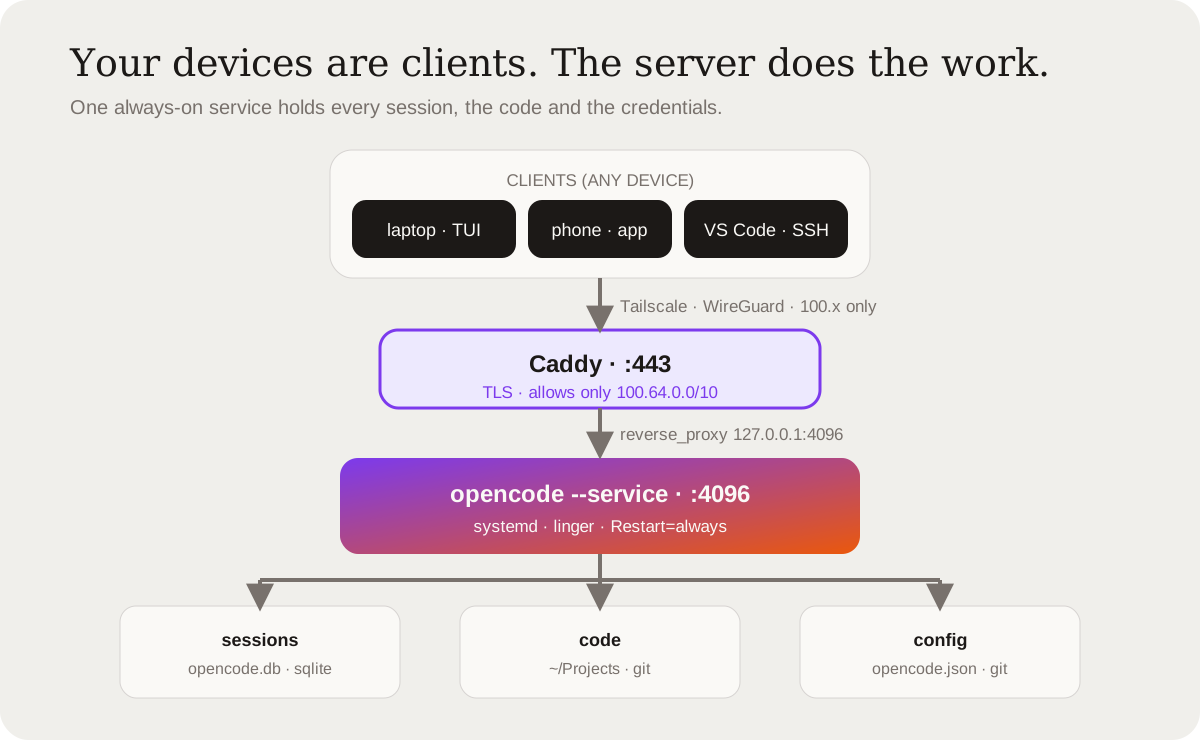
Nothing on that box is exposed to the public internet. The domain resolves to the server’s tailnet address, so the name is useless off the private network, and the proxy rejects any request whose source is outside the tailnet range.
A prompt does not travel the way you might assume. It goes to the server first, and only the server ever talks to a model.
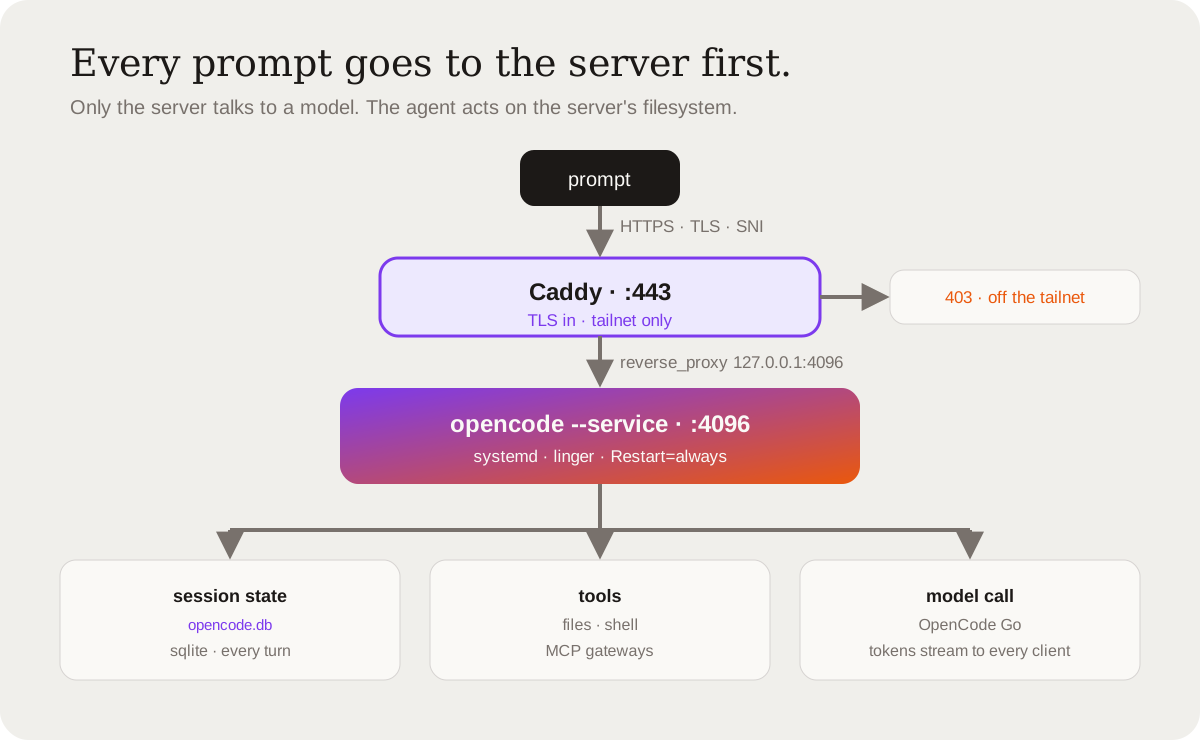
Everything the box knows lives in three places:
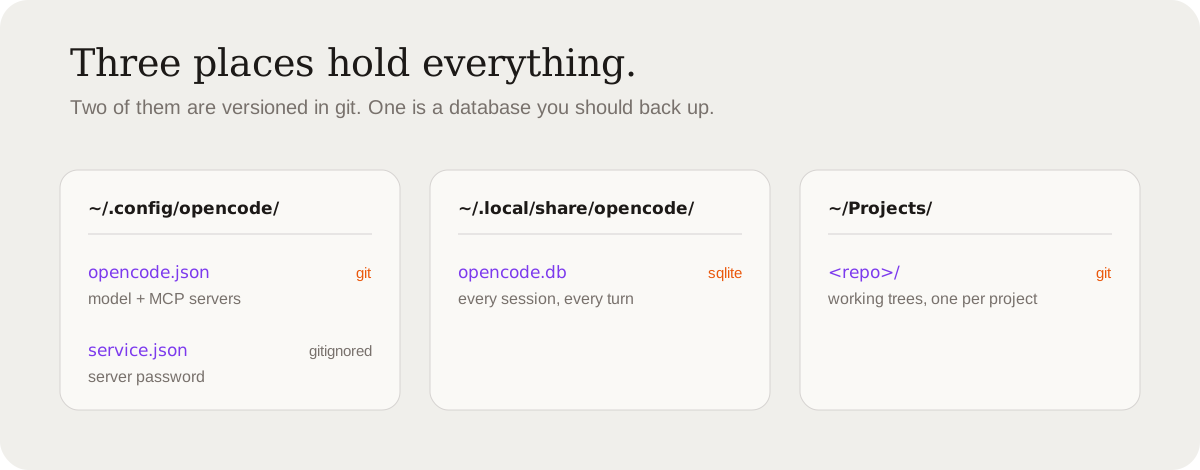
What it buys
One session, every screen. This is the whole thing. I start a task in the TUI on the laptop, continue it from the phone, finish it on a borrowed machine, and none of it is a different conversation. Before, every device was its own island. Now there is one island, and I move around it.
The machine that never closes. Closing the laptop used to mean stopping. Now the agent keeps its state and waits. I lose nothing by walking away. The work does not care whether I am at my desk.
Your laptop stops being the single point of failure. A dead battery, a bad charge, a stolen bag. When everything lives on one laptop, any of those ends your week. When it lives on a server, the laptop is replaceable by lunch.
Reach. This is the one that actually changed my habits. I work in the gaps now, in queues and waiting rooms and the ten minutes before something starts. Not because I am a productivity person. Because the friction dropped to zero. The work was simply there when I looked.
One place for the messy parts. Provider logins, API keys, the tools the agent can touch, the MCP servers it can reach. Configured once, on one box, instead of drifting across every machine I own.
What it costs
Here is the part the setup posts skip.
You now own a server. Which means you own its security. That box holds your source code, your API keys, and whatever your agent can reach. Tailscale keeps it off the public internet, but it is still a machine you are responsible for. If you would not be comfortable running a small service, you should not be comfortable running this.
The agent can act while you are not looking. Always-on cuts both ways. A session that keeps running is a session that can keep spending, keep committing, keep touching things at 3am while you sleep. The convenience and the risk are the same feature.
Your keys are on someone else’s disk. A datacenter, not your desk. You are trusting a provider, a network, and an operating system you did not build. Encryption is real, but it does not make the trust disappear.
You lose the local file. The code is on the server now, so your editor sees nothing until you point it at the server too. VS Code Remote-SSH fixes it, but it is a real change. You are no longer editing files on the machine in front of you.
One box is one blast radius. Centralizing is efficient right up until the box is down, misconfigured, or compromised. Everything you own is behind one door now.
The recurring cost, and the question nobody asks. A VPS is a monthly bill and a monthly decision. There is also a quieter one: does the way you are using your provider still match its terms? Running a subscription designed for one laptop, from a server, in a loop, is worth checking before you build a habit on it.
Setup and upkeep are real. It took a weekend the first time, and an occasional hour after that. Sessions are not magic. They need a config repo, a restart when you change something, and a backup you have actually tested.
How to build it
Eight steps. None of them are hard. The order matters more than any single command.
1. Get a small VPS. Ubuntu, 2 to 4 GB of RAM, in a region near you. Mine is a Contabo box. Provision it and SSH in.
2. Install the agent and run it as a service. A process that dies when your SSH session closes is useless here.
# ~/.config/systemd/user/opencode.service
[Service]
ExecStart=/home/YOU/.opencode/bin/opencode serve --service --hostname 127.0.0.1 --port 4096
Restart=always

[Install]
WantedBy=default.target
loginctl enable-linger $USER # survives logout
systemctl --user enable --now opencodeKeep it bound to 127.0.0.1. Nothing should reach it directly.
3. Put every device on one private network. Install Tailscale on the server and on your laptop and phone. The server gets a stable private address that only your devices can reach, and you open no ports.
4. Give it a name, privately. Point a DNS record at the server’s tailnet address. Put Caddy in front for TLS, and reject anything that did not come from the tailnet. Because the address is a tailnet address, Let’s Encrypt’s HTTP challenge cannot reach it, so issue the certificate with a DNS challenge instead.
acme.sh --issue --dns dns_cf -d '*.example.com'agent.example.com {
tls /etc/caddy/certs/example.crt /etc/caddy/certs/example.key
@off not remote_ip 100.64.0.0/10
respond @off "Unauthorized" 403
reverse_proxy 127.0.0.1:4096
}5. Move the code. Give the server git access with a deploy key or a token, then clone your repositories. The working trees live on the server now. That is the whole point.
6. Move the credentials once. This is the step people miss. Export the logins from the old machine and import them on the server.
# on the old machine
opencode auth export > auth.json
# on the server
opencode auth import auth.json
The server now has the same model and tool access, with no hand re-authentication.
7. Point the devices at it. On the laptop:
export OPENCODE_PASSWORD='...'
opencode --server https://agent.example.com
On the phone, open that address and pair by QR. For an editor, install VS Code’s Remote-SSH extension and connect to the same SSH host.
8. Version the config. Put the config directory in a git repo, with the secret file gitignored.
git -C ~/.config/opencode init
git -C ~/.config/opencode add -A
git -C ~/.config/opencode commit -m "opencode config"
Now a config change is a commit instead of a memory.
Two habits keep the whole thing alive: restart the service after any config change, because it does not hot-reload, and back up the session database, because that file is the only copy of your history.
When this is worth it
It is worth it if you work across more than one device, if you travel, if you want continuity more than you want a light pack, and if you are willing to treat a server as something you own and must defend.
It is not worth it if you work on exactly one machine, if your code is sensitive in a way you cannot hand to a provider, or if the draw is the feeling of working from anywhere rather than the need. Reach you do not use is just a bill.
The thing I actually learned
The laptop was never the point. It was where the work happened to live, because that was the easy place to put it.
The work should outlive the machine. Any machine. The question is not which device you work from. It is where the work lives, and who can reach it. Answer that on purpose and the devices become interchangeable. Ignore it and you will keep treating your laptop like it is the business.